Watch it draw itself · tap to replay
How to Draw a City Square with Big Screens
Draw a city square with big screens in 14 easy steps, about 11 minutes. Free, with a printable worksheet.
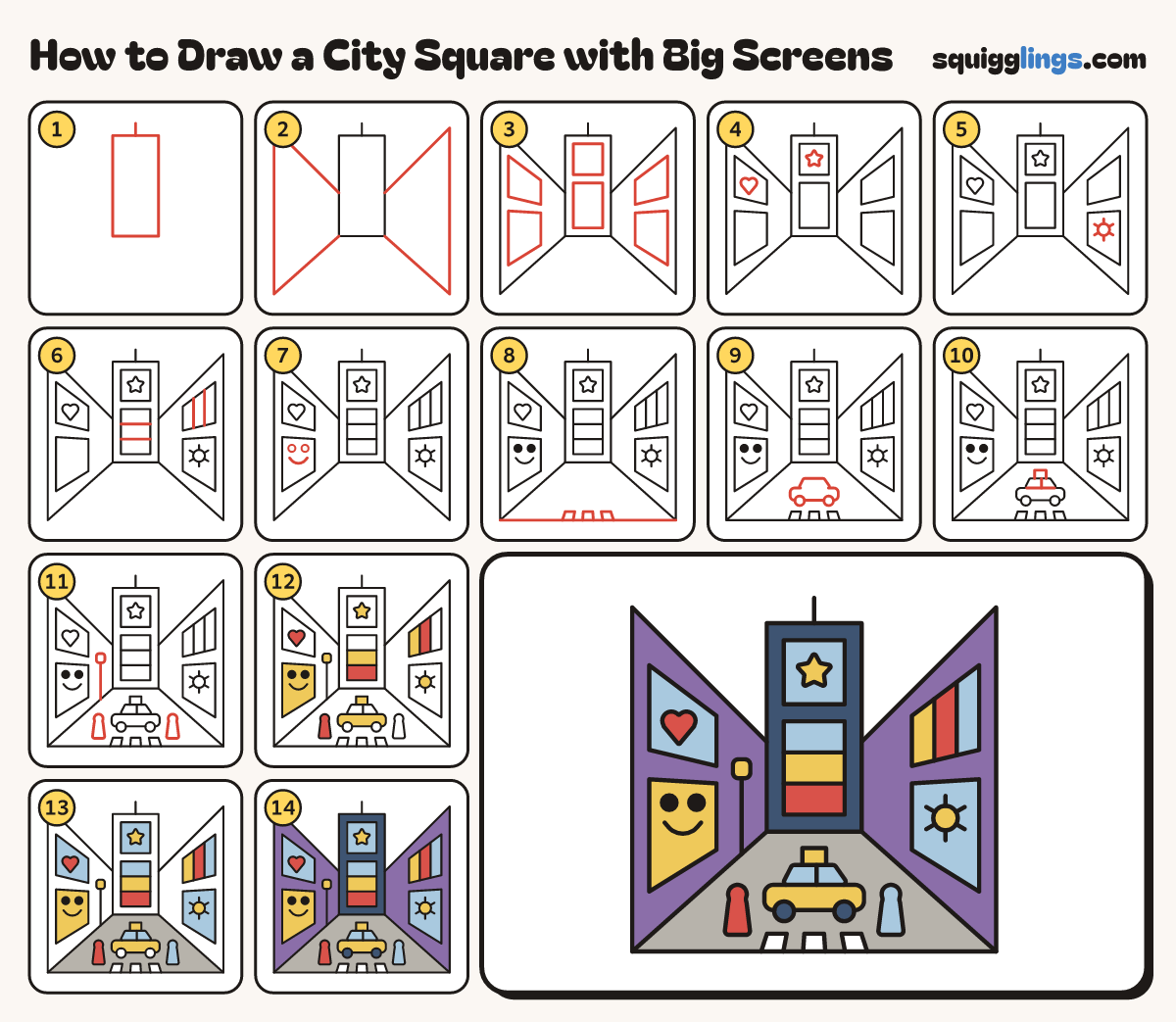
Each picture adds a little more, in red. Draw just that, then scroll to the next picture. First up: far tower.
Step 1: Far tower
In the middle draw a tall thin box. Add a short mast: start on its top, stop above it.
Tip Leave room below it for the street.
Step 2: Side buildings
Start on each side of the tower, below its middle. Slant up and out, straight down, back to its corner.
Tip The slanted lines aim at one point hidden behind the tower. Stop each at the tower's bottom corner.
Step 3: Six screens
Draw 2 big screens on each building, slanted like its roof and ground. Draw 2 more on the tower.
Tip The sides of every screen go straight up and down. Leave a wide rim of wall round each one.
Step 4: Star and heart
Draw a star on the tower's top screen. Draw a heart on the top left screen.
Tip Screens in this square show plain pictures. Keep each picture clear of its screen's edges.
Step 5: A sun
On the bottom right screen draw a small circle. Add 6 short rays. Start each on the circle.
Tip One ray points up, one down, and 2 slant out on each side. Stop each before the screen's edge.
Step 6: Colour stripes
Draw 2 lines down the top right screen and 2 across the tall tower screen. Start and stop on edges.
Tip Each screen now has 3 stripes.
Step 7: Smiling screen
On the bottom left screen draw 2 big dot eyes and a wide smile. Colour the eyes in black.
Tip This is the only face in the picture.
Step 8: Kerb and crossing
Join the 2 bottom corners with a line. Draw 3 blocks on it. Start and stop each on the line.
Tip The blocks are the stripes of a crossing. Leave them white.
Step 9: A car
On the road draw 2 small wheels. Draw a long body round them, with a cabin on top.
Tip Keep the car between the tower and the crossing.
Step 10: Taxi windows
From the cabin's left edge draw a line across to its right edge. Add a post and a roof light.
Tip The post goes from the roof down to your line. The roof light is a small box that starts and stops on the roof.
Step 11: Lamp and walkers
Start on the left building's ground line. Draw a lamp post up. Stop under a box lamp. Add 2 walkers.
Tip Put a tiny walker on the road each side of the car: a round head on a body that widens to the ground, with no face.
Step 12: Yellow and red
Colour the star, sun, smiling screen, taxi and 2 stripes yellow. Colour the heart, 2 stripes and left walker red.
Tip The lamp is yellow too. Top right screen: first stripe yellow, middle red. Tower: middle stripe yellow, bottom red. Leave the taxi's windows.
Step 13: Blue and grey
Colour 3 screens, the last 2 stripes, the taxi's windows and the right walker light blue. Colour the road grey.
Tip Colour round the star, heart and sun. Leave the crossing white.
Step 14: Purple and navy
Colour the 2 buildings purple. Colour the tower and the taxi's wheels navy. Go over your lines.
Tip Colour round every screen and the lamp. Your city square is lit up!
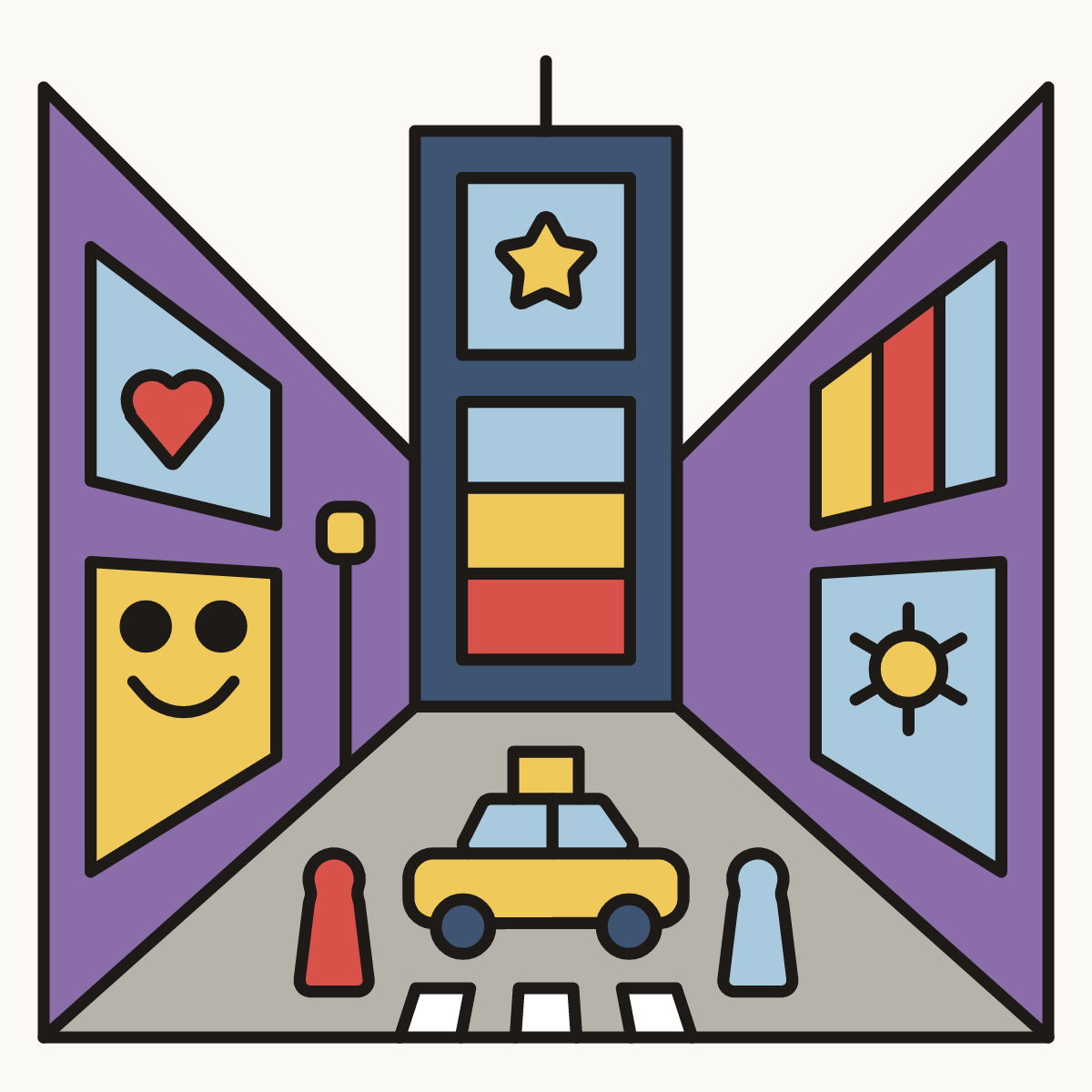
Your finished drawing
Follow the steps above and this is where you end up: a city square with big screens, drawn by you.
Every step in one picture