Watch it draw itself · tap to replay
How to Draw a Digital Clock
Draw a digital clock in 12 easy steps, about 9 minutes. Free, with a printable worksheet.
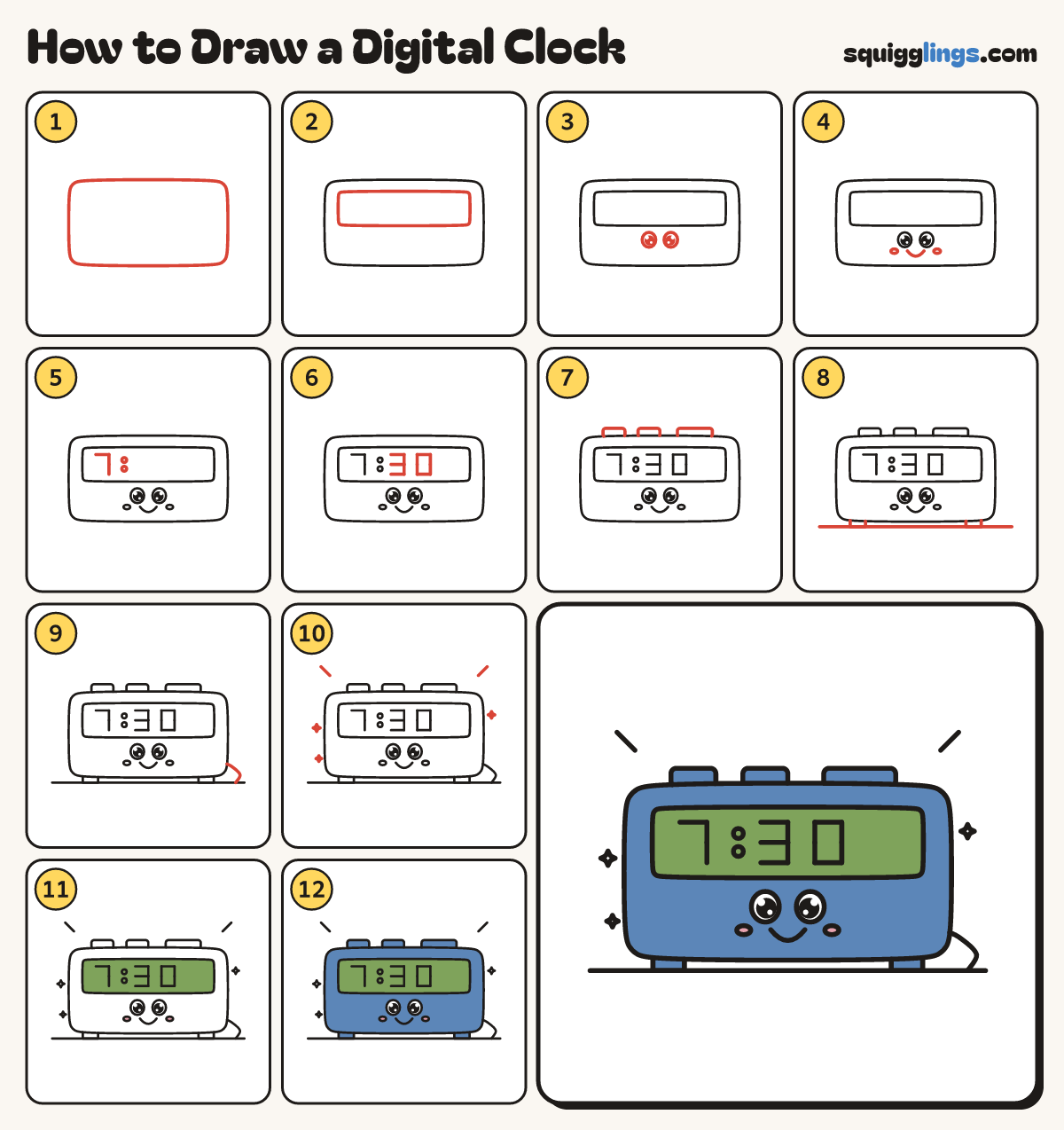
Each picture adds one red line. Draw that line, then scroll to the next picture. Rub out any dashed helper lines at the end. First up: the clock box.
Step 1: The clock box
In the middle of your paper draw a wide box with rounded corners, twice as wide as it is tall.
Tip Make it wide: the numbers need room.
Step 2: The screen
Inside the box, near the top, draw a long thin box for the screen, leaving a gap all round.
Step 3: Two big eyes
Under the screen draw 2 big egg eyes, a little apart. Colour a big black dot in each.
Step 4: Smile and cheeks
Under the eyes draw a small U smile from eye to eye, and a little oval cheek beside each end.
Step 5: Seven and dots
On the left of the screen draw a 7 with straight little lines, then 2 dots one above the other.
Tip Each number is short straight lines only, no curves.
Step 6: Three and zero
After the dots draw a 3 and a 0, both made of straight lines. It says 7:30!
Step 7: Buttons on top
On top of the box draw 3 flat buttons: 2 little ones on the left and a long snooze bar.
Step 8: Feet and table
Under each end of the box draw a tiny square foot. Draw a long table line under both feet.
Step 9: The cord
Start at the right side of the box, near the bottom. Draw a wavy cord down to the table line.
Step 10: Buzz lines and sparkles
Add 2 short buzz lines off the top corners and 3 little sparkles around the clock.
Step 11: Green screen, pink cheeks
Colour the screen pale green and the cheeks pink. Leave the eyes white.
Step 12: Blue box
Go over your lines. Colour the box, buttons and feet blue, around the screen, eyes and cheeks. Beep beep!
Your finished drawing
Follow the steps above and this is where you end up: a digital clock, drawn by you.
Every step in one picture