Watch it draw itself · tap to replay
How to Draw a Website
Draw a website in 13 easy steps, about 10 minutes. Free, with a printable worksheet.
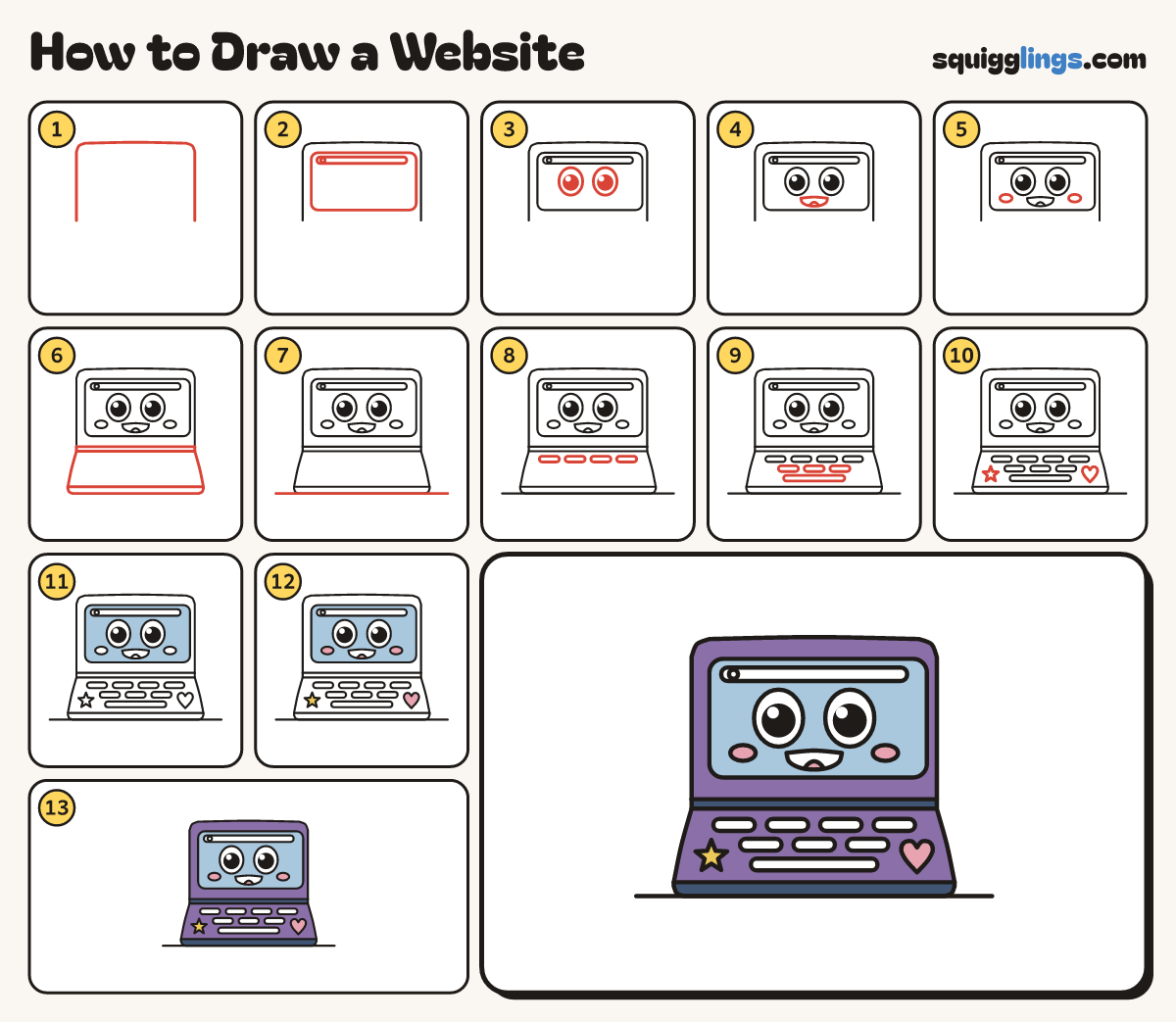
Each picture adds one red line. Draw that line, then scroll to the next picture. Rub out any dashed helper lines at the end. First up: the lid.
Step 1: The lid
Start below the middle, left. Draw a big upside-down U lid, wider than tall, stopping level on the right.
Tip The lid is more than half the laptop, so make it big.
Step 2: Screen and address bar
Draw a rounded screen inside the lid, with an address bar across its top and a circle at its left.
Step 3: Two big eyes
Under the bar draw 2 big egg eyes, a finger apart. Colour a black dot in each, leaving a shine.
Tip Make the eyes big, the pair wider than half the screen, with a gap under the bar.
Step 4: A big smile
Under the eyes draw an open smile: a line from pupil to pupil, a U under it, and a tongue.
Step 5: Rosy cheeks
Just below the outside corner of each eye draw a small sideways oval cheek, touching nothing.
Step 6: Hinge and keyboard part
Close the lid with 2 hinge lines. From them draw the keyboard part down to a thin front edge.
Tip The keyboard part is a little wider than the lid and half as tall.
Step 7: The desk
Along the laptop's bottom draw a long desk line, from near the page's left edge to near its right.
Step 8: Top row of keys
Just below the hinge draw a row of 4 wide pill keys, as wide as the screen, with gaps between.
Step 9: More keys and spacebar
Under the top row draw 3 more pills, one under each gap. Under those draw one long spacebar pill.
Step 10: Stickers
Beside the spacebar draw a 5-point star sticker on the left, and a heart the same size on the right.
Step 11: Sky screen
Go over your lines. Colour the screen sky blue, leaving the address bar, eyes, mouth and cheeks white.
Step 12: Pink cheeks, yellow star
Colour the cheeks, tongue and heart pink, and the star yellow.
Step 13: Purple and navy
Colour the laptop purple around the screen, keys, stickers, hinge and front edge. Colour the hinge and front edge navy.
Your finished drawing
Follow the steps above and this is where you end up: a website, drawn by you.
Every step in one picture