Watch it draw itself · tap to replay
How to Draw Mission Control
Draw mission control in 17 steps, about 13 minutes. Free, with a printable worksheet.
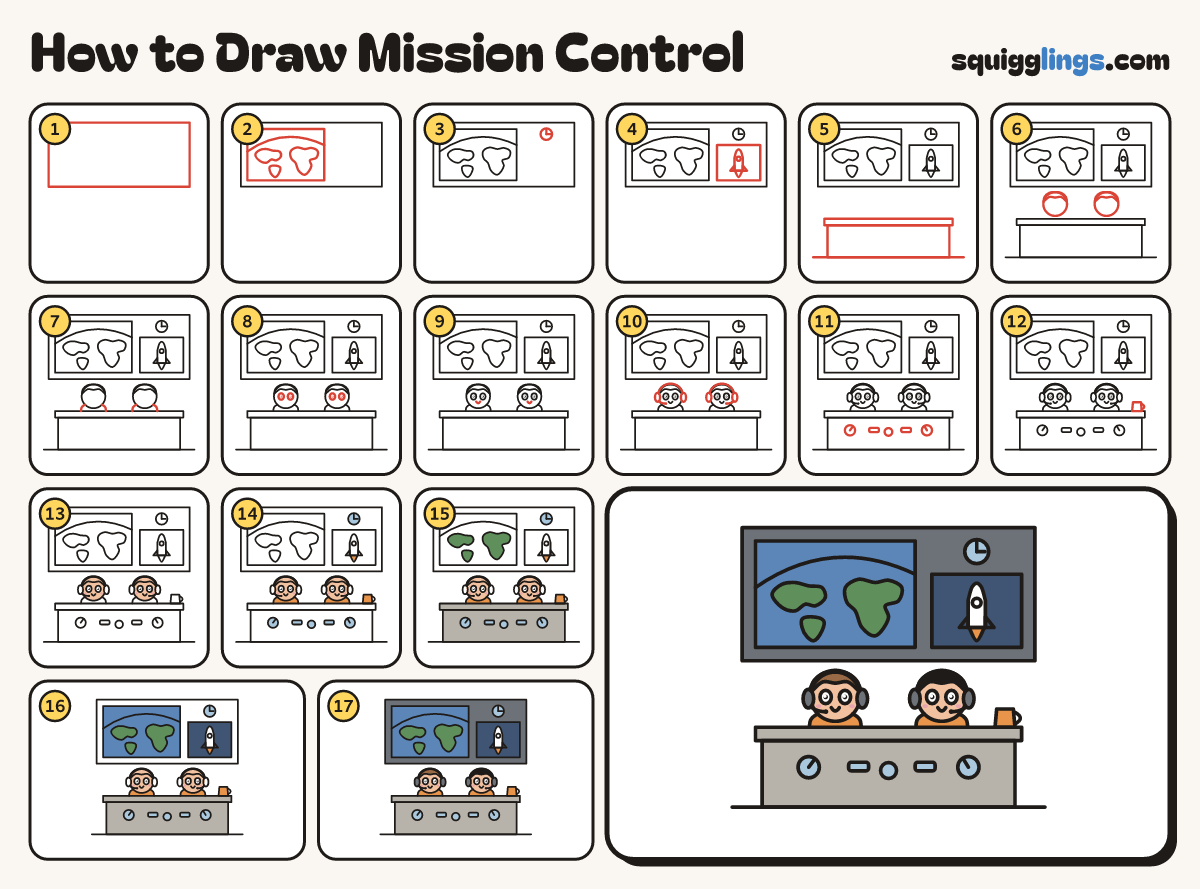
Each picture adds one red line. Draw that line, then scroll to the next picture. Rub out any dashed helper lines at the end. First up: the big wall.
Step 1: The big wall
Across the top of your paper, draw a wide box for the big wall, nearly the full width.
Tip Everyone in mission control faces the giant screens on the front wall.
Step 2: World map screen
Draw a big map screen on the left with 3 bumpy lands. Arch an orbit over them, edge to edge.
Step 3: A clock
Right of the map, near the top of the wall, draw a round clock with 2 hands.
Step 4: Rocket screen
Under the clock, draw a screen with a rocket inside: 2 fins, a round window and a flame.
Step 5: The console desk
Under the wall, draw a long flat desk top with a big box front under it. Add the floor line.
Tip The desk faces YOU: the controllers sit behind it, screens behind them.
Step 6: Two heads
Behind the desk, draw 2 round heads, each with a cap of hair on top.
Step 7: Shoulders
Under each head, draw a rounded shoulder bump. Start on the desk and come back down to it.
Step 8: Big eyes
In each head, draw 2 big round eyes, each with a black dot and a tiny shine.
Step 9: Smiles
Below the eyes on each face, draw a small smile, starting and stopping under the eyes.
Step 10: Headsets
Give each head a band with ear pads. Add a mic from a pad to a ball by the mouth.
Step 11: Dials and buttons
On the desk front, draw 2 round dials with pointers, a smaller dial between them, and 2 flat buttons.
Step 12: A mug
On the desk top, near the right end, draw a little mug with a curved handle.
Step 13: Peach faces
Go over your lines. Colour the faces peach with two pink cheeks each. Leave the eyes white.
Step 14: Orange and sky
Colour the shirts, the mug and the flame orange, and the dials, buttons and clock sky blue.
Step 15: Grey desk, green land
Colour the desk grey around the dials and buttons, and the lands on the map green.
Step 16: Blue map, navy screen
Colour the map blue around the lands, and the rocket screen navy around the white rocket and flame.
Step 17: Slate wall, dark hair
Colour the ear pads and the wall slate, around the screens and clock, and the hair brown and black.
Your finished drawing
Follow the steps above and this is where you end up: mission control, drawn by you.
Every step in one picture